Text & Voice in Noto
Last updated: August 19, 2026
Text & Voice in Noto
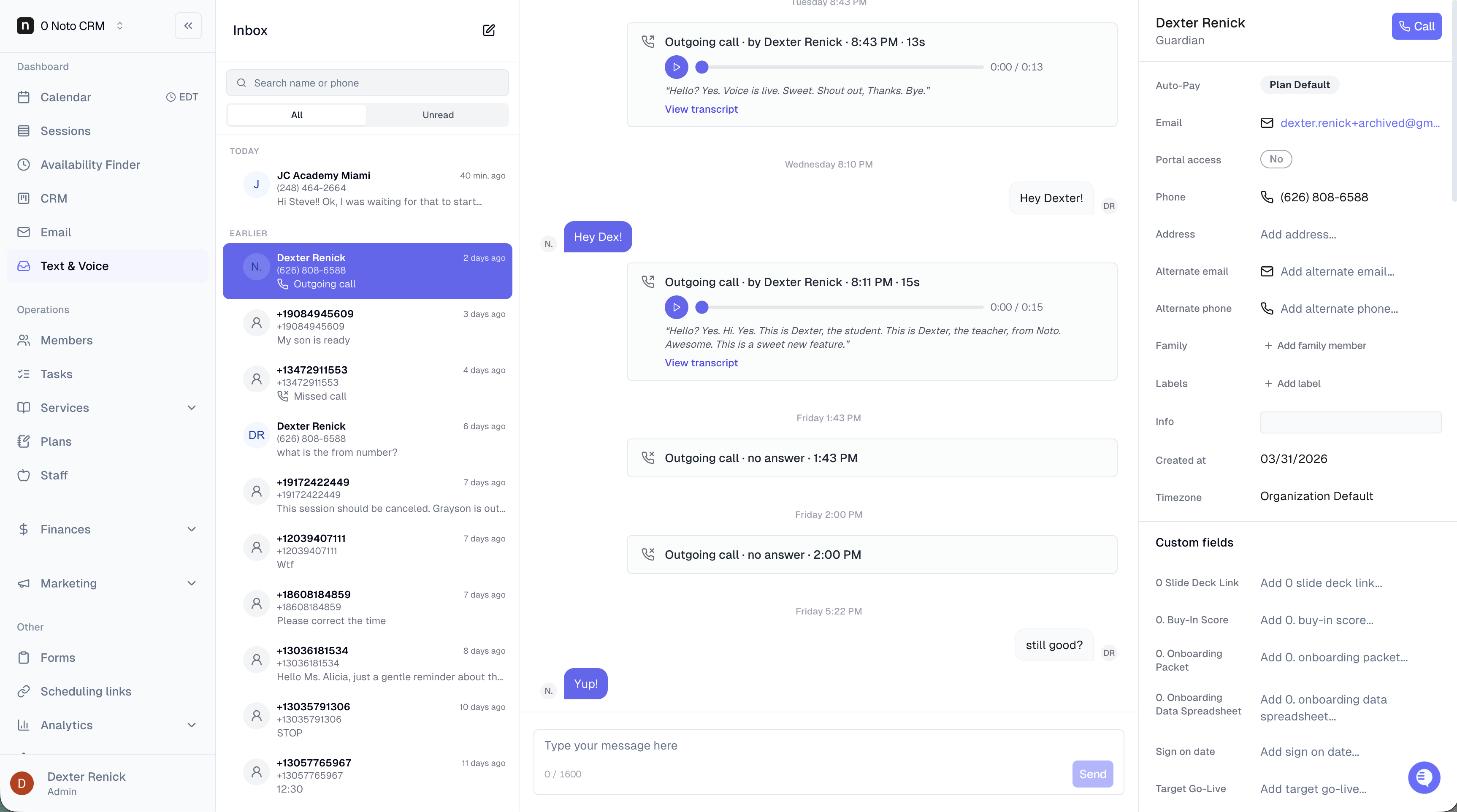
Noto can be your studio's phone line. Text your members, call them, take their calls — all from inside Noto, all tied to the member they're talking to. Every conversation, by text or by phone, lands in one inbox and stays attached to the member's profile and visible in the CRM.
Here's how each piece works.
Calling a member (outbound)
You don't need a desk phone or a softphone app. Calling lives where you already work, in your browser.
Open a member's conversation in the Text & Voice inbox.
Hit the Call button in the side panel.
The call connects through your browser, from your studio's number.
The member sees your number on caller ID — not a random one.
Getting called (inbound)
Your Noto number doesn't ring inside the browser. When a member calls it, Noto forwards the call out to your team's real phones — cells, front desk, whoever you've listed — so it reaches you wherever you are.
Here's how forwarding behaves:
List as many numbers as you want. Your cell, the front desk, a manager — anyone who should be able to pick up.
They all ring at once. Noto doesn't call them one at a time; every forwarding number rings simultaneously.
First to answer gets the call. Whoever picks up first is connected, and the rest stop ringing. (A carrier voicemail picking up doesn't count as an answer — the call keeps going to the others.)
Each number can have its own hours. Give a number a schedule so it only rings when that person's actually on — the front desk during business hours, an owner's cell in the evening. Outside its hours, it just sits out.
No answer means voicemail. If nobody picks up, the call falls through to voicemail. The recording and transcript land right in the member's conversation history, so even a missed call is a logged, readable interaction.
Add or change forwarding numbers and their hours anytime in Settings → Text & Voice.
Routing calls with a phone menu (branching)
By default, one call to your Noto number rings your whole forwarding list at once. If you want callers routed to different teams instead, add branches to turn your number into a phone menu:
Give each branch a spoken name — "Sales," "Billing," "Front desk" — and Noto reads it back as "Press 1 for Sales, press 2 for Billing…"
Each branch has its own forwarding list, so billing calls only ring the billing phones.
The forwarding rules still apply within a branch: everyone on it rings at once, first to answer wins, and each number can keep its own hours.
Drag branches to reorder them — the order sets which key reaches which branch.
Build up to nine branches.
If a caller doesn't press anything, the menu repeats a couple of times, then sends them to voicemail — no call gets dropped.
Greeting and voicemail
Both the opening greeting and the voicemail prompt are yours to write, in Settings → Text & Voice:
Greeting — plays at the start of an inbound call, e.g. "Thanks for calling! We'll be right with you." Leave it blank and Noto skips straight to the call.
Voicemail message — plays right before the beep, e.g. "You've reached Acme. Leave a message and we'll call you back." Leave it blank and callers hear the default: "Please leave a message after the tone."
Every call is recorded, transcribed, and logged
Noto records and transcribes calls automatically on both sides — inbound and outbound, every time. Nothing to toggle per call, and nothing to remember: you can read back what was said later.
Every call shows up on the member's record in the CRM, right alongside your texts with them:
That a call happened, which direction, and when
The recording, ready to play back
The full transcript
Any voicemail, if the call went unanswered
Any admin on your team can open a member and see the whole history — calls and texts together — and pick up the conversation without losing context.
Text
Texting works from the same place, the same way.
Send one-to-one texts to members straight from the inbox.
Replies come back into the same inbox your team already works in.
Texts come from your number, so members see a familiar caller ID instead of a generic shortcode.
Like calls, texting history stays attached to the member profile, so the full back-and-forth is always there.
Unsubscribe Behavior
If a member texts the org number with the word "STOP" you will no longer be able to text that user due to legal texting requirements. You will see an error message when trying to text that member. To resume conversation, they will need to send a text saying "START" to continue to receive messages.
Other Text Features
Send a text to multiple members at once
You can reach a filtered group of members in one shot from the Members page — useful for announcements, schedule changes, or anything that needs to go to a specific segment.
1. Head to the Members page and use the checkboxes to select who you want to reach.
2. Open the Actions menu and choose Send text message.
3. Write your message and send. Every selected member gets it as an individual text from your Noto number — their replies come back into your shared inbox like any other conversation.
Members without a phone number on file, or who have opted out, are automatically skipped.
Send session notes by text
After writing shared notes on a session, you can push them as a text instead of — or in addition to — an email. Helpful when families are more responsive to SMS.
1. Open a session and write your shared notes.
2. Choose Text as the send method (alongside the Email option).
3. Select your recipients — student, guardians, or both — and send.
The note lands in the family's existing conversation thread in your inbox, so the context stays in one place.
Text a family directly from a session on mobile
On mobile, you don't have to leave the session to start a text — there's a shortcut that drops you straight into the conversation.
1. Open any session on mobile.
2. Tap Text family.
3. Send a mass text to the families of the given session.
Getting set up
Text & Voice isn't on by default, and pricing depends on your plan, how you'll use it, and message and call volume.
To turn it on for your studio, talk to your Noto success partner. They'll walk you through pricing for your setup and get you live.