How do coupon codes work?
Last updated: July 7, 2026
Coupon Codes
Coupon codes are created by admins and shared with specific clients or audiences (e.g., via email, social media, or partner organizations). When a client self-registers for a class and pays upfront, they enter the code on the enrollment form to receive a discount on the purchase price.
Note: Coupon codes can only be used in Self-Enrollment Forms or other forms that collect upfront payment.
Types of Discounts
Coupons support two discount types:
Type | How It Works | Example |
|---|---|---|
Dollar amount off | Reduces the price by a fixed dollar value |
|
Percentage off | Reduces the price by a percentage of the total |
|
100% off (Free) | Percentage set to 1.0 (100%) — makes the item free |
|
Creating a Coupon
Coupons are created by admins in the Noto dashboard by navigating to Pricing -> Coupons. Each coupon includes:
Coupon Name — an internal label for your reference (e.g., "Memorial Day Promo")
Coupon Code — the code clients enter (e.g.,
MDW15); typically short and uppercaseDiscount Type — dollar amount off or percentage off
Expiration Date — optional; the code becomes inactive after this date
Active / Archived — coupons can be deactivated without deleting them
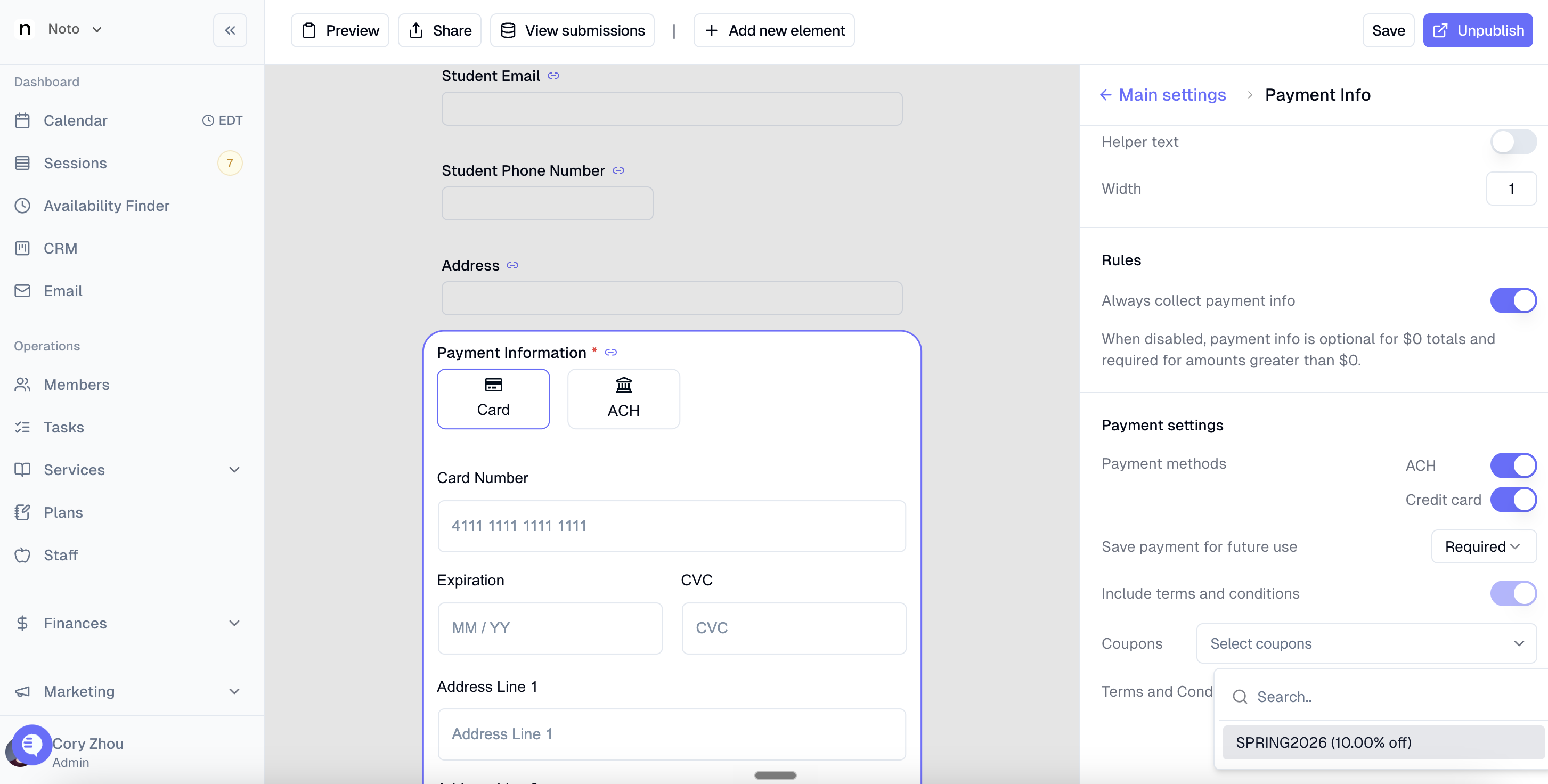
Coupons can then be marked as eligible for particular forms by clicking into the "Payment Information" field on the specific form and selecting the appropriate coupon(s).
How Clients Apply a Coupon
The client receives the coupon code (via email, social media, partner, etc.)
They navigate to your self-enrollment or registration form
During the checkout/payment step, they enter the coupon code in the designated field
The discount is applied to the upfront payment amount before they submit
Common Use Cases
Limited-time promotions — shared via social media (e.g., Facebook) for a set window
Partner or IEC discounts — unique codes given to students referred by partner organizations (e.g.,
COUNSELMORE,COLLEGESHARKS)Referral rewards — one-time codes rewarding clients who refer others (e.g.,
REFER50)Scholarship or sponsored seats — 100% off codes for fully subsidized enrollments (e.g.,
MOQF20T4,NAE-INSIDER)Upgrade discounts — dollar-off codes applied when a client upgrades from one package to another
Event or partner sponsorships — codes tied to specific organizations or community partnerships
Current Limitations
Coupon codes are not supported on installment billing plans — they apply to upfront, full payments only.
Coupon codes on self-enrollment forms are not yet natively integrated into the enrollment form flow for all plan types. This is a planned product improvement. In the meantime, contact your Customer Success Manager to discuss the best workaround for your setup.
Codes are scoped to your organization — codes from other Noto organizations cannot be used in your forms.
Managing Coupons
Archiving a coupon deactivates it without deleting the record, preserving historical usage data.
Expiration dates automatically deactivate a coupon after a specified date and time.
Coupon codes are case-insensitive when entered by clients but are stored in uppercase by convention.
Common Questions
Can I apply a coupon to a recurring payment or installment plan?
No. Coupon codes only apply at the time of self-registration with upfront payment.
What happens if a coupon is expired?
The client will receive an error and the discount will not be applied. Make sure to share codes with accurate expiration dates in your promotions.
Can I create a code that makes a class completely free?
Yes. Set the discount type to percentage and enter 1 (100%). The client will be able to enroll without paying.
What classes can coupon codes be used for?
Coupons can be created for any group class type (e.g., intensive programs, workshops, boot camps). They are not typically used for private sessions or installment-billed enrollments.