How Monthly and Weekly Prepaid plans create and update invoices
Last updated: October 29, 2026
Monthly Prepaid and Weekly Prepaid plans bill families before their lessons happen, based on the sessions on the calendar. This article covers when invoices are created, how they change when the schedule changes, and how draft invoices work.
Monthly Prepaid bills each calendar month. Each class is priced by its length, using the plan's duration prices.
Weekly Prepaid bills each Monday–Sunday week, at one hourly rate. A 45-minute session on an $80/hour plan is $60.
When to use these plans: they work best when each family's schedule for the coming month or week is mostly set in advance, such as a regular weekly lesson. Families pay up front for exactly the lessons on their calendar. Once an invoice is paid it no longer changes.
Each enrollment gets one invoice per month or week. If Combine family invoices is on, a family's prepaid enrollments for the same month or week share an invoice.
Choosing how invoices are created
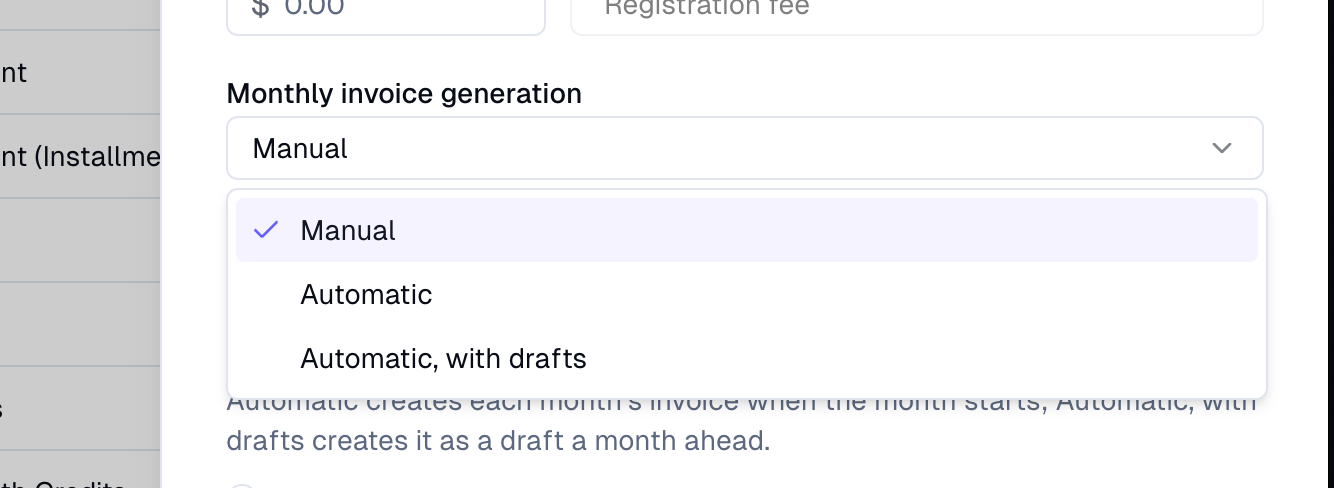
Each plan has an invoice generation setting: Monthly invoice generation or Weekly invoice generation, on the plan form. There are three options:
Manual (default for monthly plans): invoices are only created when a student enrolls and when you click Generate.
Automatic: each month's or week's invoice is created when that month or week starts, finalized and visible to the family.A weekly invoice appears on Monday morning and a monthly invoice on the 1st.
Automatic, with drafts: each invoice is created as a draft one month or week ahead. For example, November's drafts appear on October 1, and next week's drafts appear this Monday. Drafts are hidden from families and autopay won't charge them, so you can review and adjust them first.
If your plan has an invoice due date before the billing cycle starts, automatic invoices are created early enough to meet it. See Setting an invoice due date before the billing cycle starts.
Existing plans: Weekly Prepaid plans were set to Automatic, so weekly invoices keep arriving every Monday as before. Monthly Prepaid plans were set to Manual, which is how they worked before.
When draft invoices are finalized
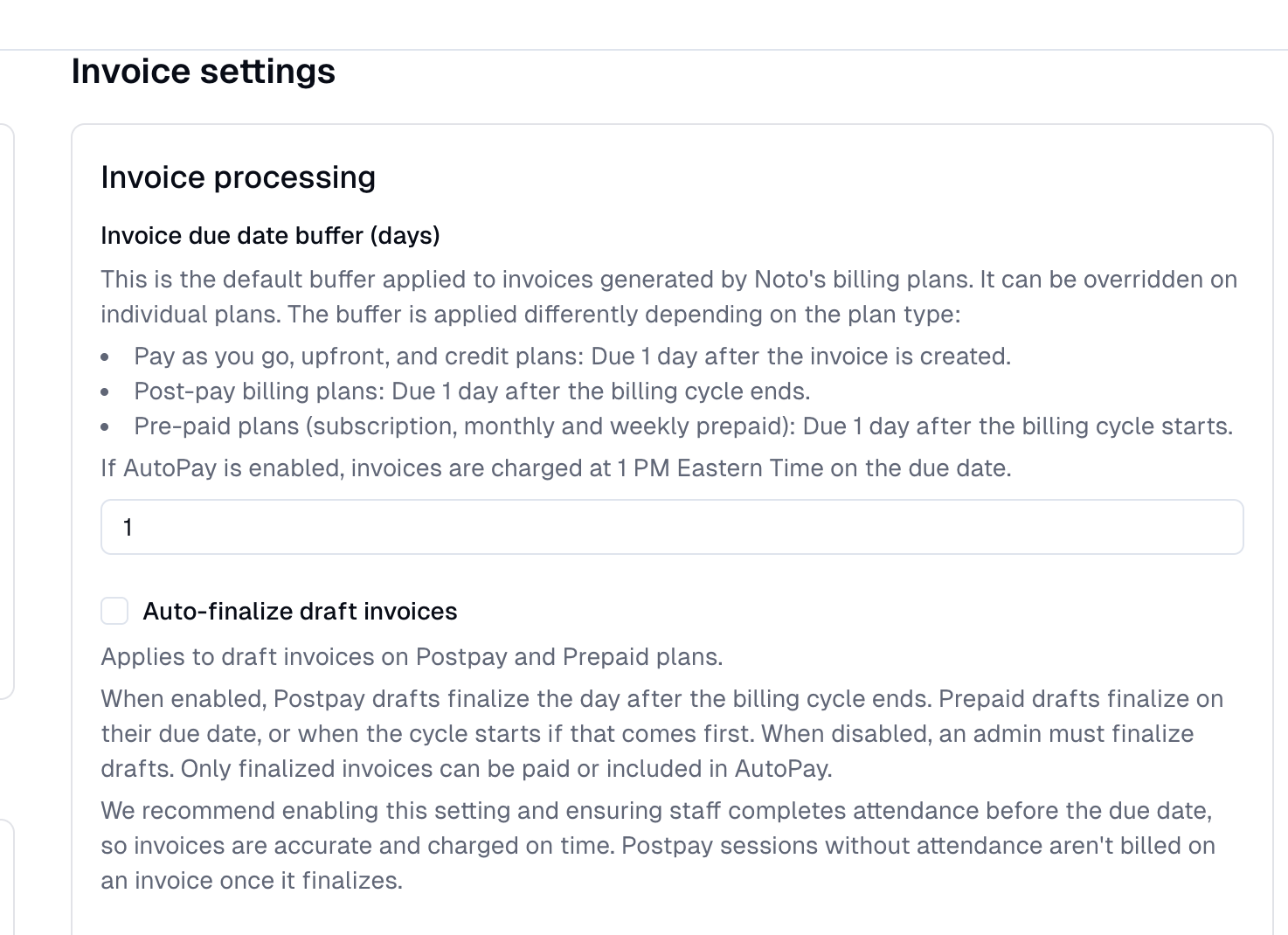
This is controlled by your organization's Auto-finalize draft invoices setting (Settings → Billing), the same setting Postpay plans use.
On: a draft is finalized automatically when its month or week starts, or on its due date if that comes first. The invoice shows a Finalizes on date.
Off: drafts stay drafts until an admin finalizes them.
Once finalized, the family can see and pay the invoice, and autopay can charge it.
Invoices follow the calendar until they're paid
While an invoice is unpaid, Noto keeps it in sync with the calendar. This applies to every Monthly and Weekly Prepaid plan, whatever its invoice generation setting, and to drafts and finalized invoices alike. Each session is one line item on the invoice.
When you… | What happens to the session's line item |
|---|---|
Add a session, or add a student to one | Added to that month's or week's invoice |
Cancel or delete a session, or remove a student | Removed |
A member cancels on time | Removed. A late cancel or no-show stays charged |
Change a session's length | Recalculated |
Move a session within the same month or week | Date and time updated |
Edit the enrollment's recurring discount or charge | Discount or charge updated to match |
Book a session with a makeup credit | Charged $0 |
Move a session into a different month or week | Stays on the invoice it was first billed on, labeled "(rescheduled)". Not billed again on the other invoice |
If that month or week has no invoice yet: on Automatic plans, Noto creates one if the session is in the current month or week (or the next one, on Automatic, with drafts). Sessions further out are billed when their invoice is created. On Manual plans, they're billed when you click Generate.
If every line item comes off an unpaid invoice, the invoice is removed.
This only applies to invoices created on or after October 27, 2026. Finalized invoices from before then don't change.
Once an invoice is paid
An invoice stops changing once it's paid.
A session added to that month or week afterward isn't billed automatically, and no second invoice is created. You can add a line to an invoice by hand if you want to charge for it.
A session cancelled afterward doesn't change the invoice. Your cancellation policy decides whether the family gets an invoice credit or makeup credit.
A session moved out of that month or week isn't billed again.
Enrolling a student
When you enroll a student, Noto invoices the current month or week right away:
Sessions that already happened before enrollment are $0.
The remaining sessions in that month or week are charged as normal.
If the student has no sessions in the current month or week, there's no enrollment invoice (unless the plan has an initial fee). Their sessions are billed with their own month or week.
On a plan set to Automatic, with drafts:
With Auto-finalize draft invoices on, the enrollment invoice is finalized right away. To keep it hidden from the family, tick Keep invoice as draft when enrolling. It then stays a draft until its due date.
With Auto-finalize draft invoices off, the enrollment invoice is a draft until an admin finalizes it.
Enrollments made through public forms and checkout are always finalized, since the family pays at checkout.
Generating invoices on demand
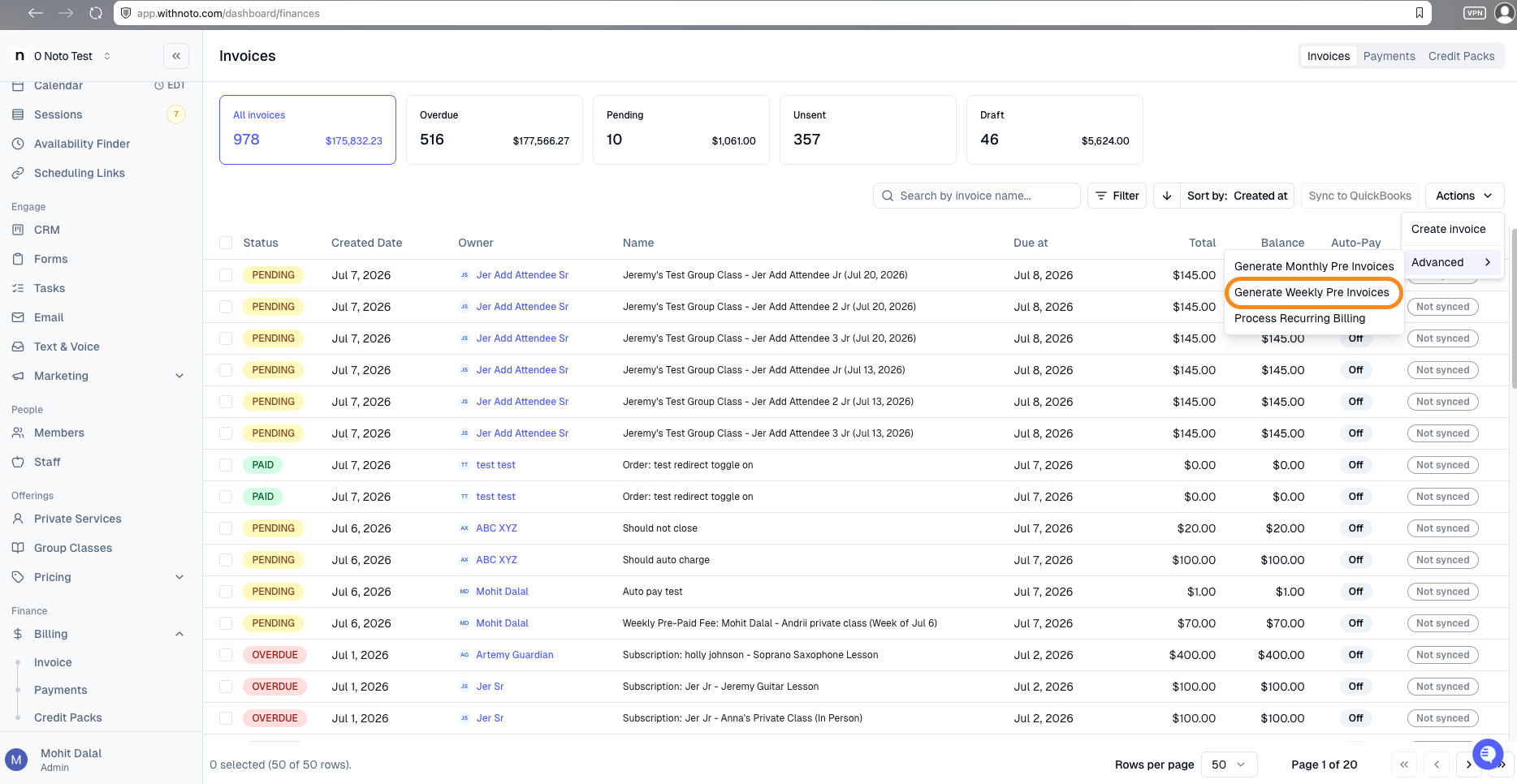
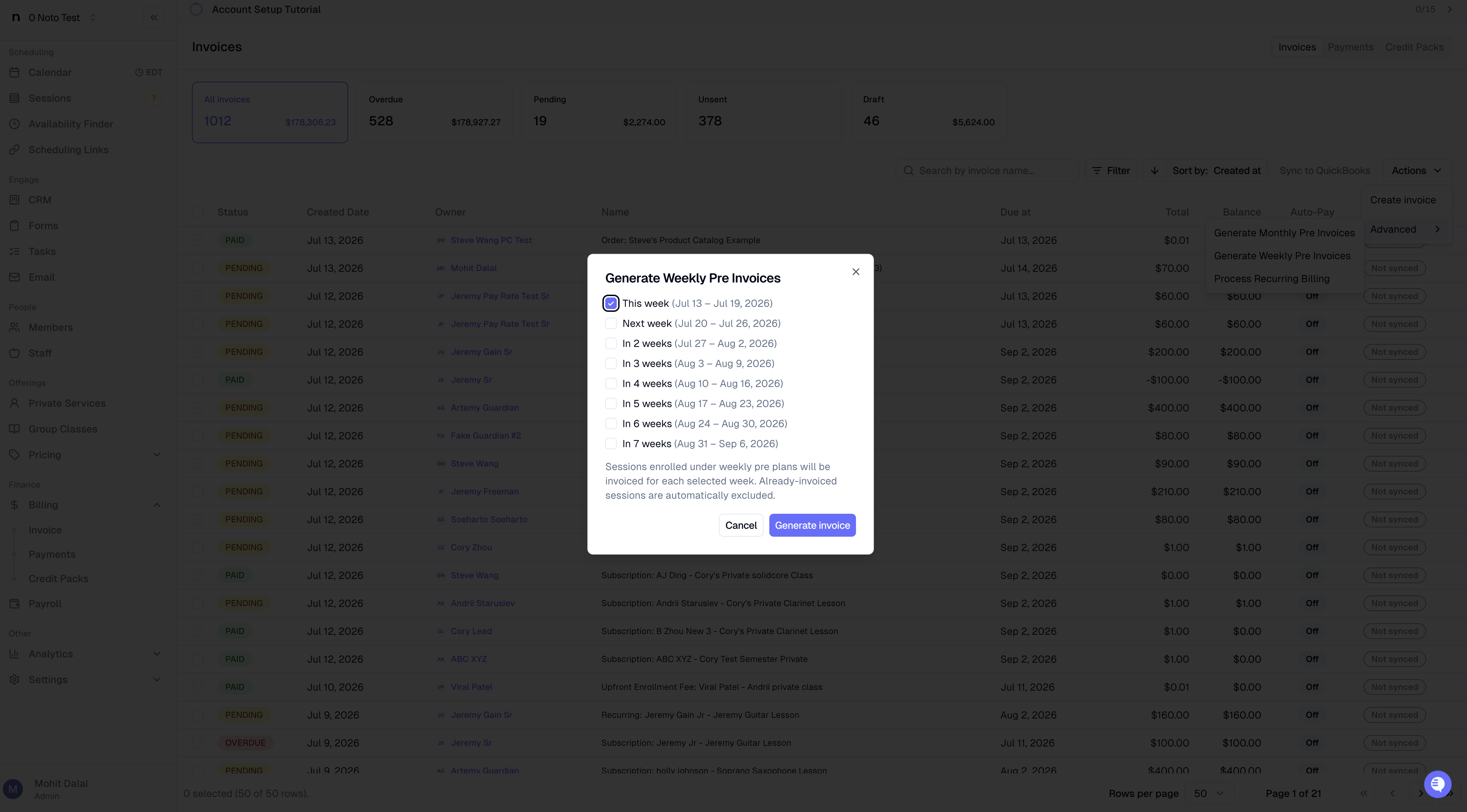
You can create invoices yourself at any time, whatever the plan's setting. Go to the Invoices section of the Finance dashboard, click Advanced → Generate monthly pre invoices or Generate weekly pre invoices, choose the month(s) or week(s), and click Generate invoice(s).
Sessions that are already invoiced are skipped. On plans set to Automatic, with drafts, generated invoices are drafts.
Common questions
I switched a plan to Manual. What happens to its invoices? No new invoices are created automatically. Existing unpaid invoices still follow the calendar, and existing drafts are still finalized as usual.
A family paid, then we added a lesson to the same month. Why wasn't it billed? Paid invoices don't change, and Noto doesn't create a second invoice for the same month or week. Add the lesson to an invoice by hand if you want to charge for it.
Why does an invoice include a session dated in the next month? The session was moved after it was billed. It stays on its original invoice, labeled "(rescheduled)", and isn't billed again next month.
Can families see draft invoices? No. Families only see an invoice once it's finalized.