Personalizing marketing emails with merge tags
Last updated: August 21, 2026
Merge tags (also called personalization tokens or template variables) let you drop a recipient's details into an email so each person sees their own name in the subject line or body. Noto's marketing suite supports this in the email composer.
Inserting a merge tag
You have two ways to add a tag in the marketing suite composer:
Click the
{ }button in the composer toolbar to open the insert-variable menu, then pick the field you want.Type the tag directly using double curly braces, for example
{{customer.first_name}}or{{customer.last_name}}.
Both options work in the subject line and the body of the email.
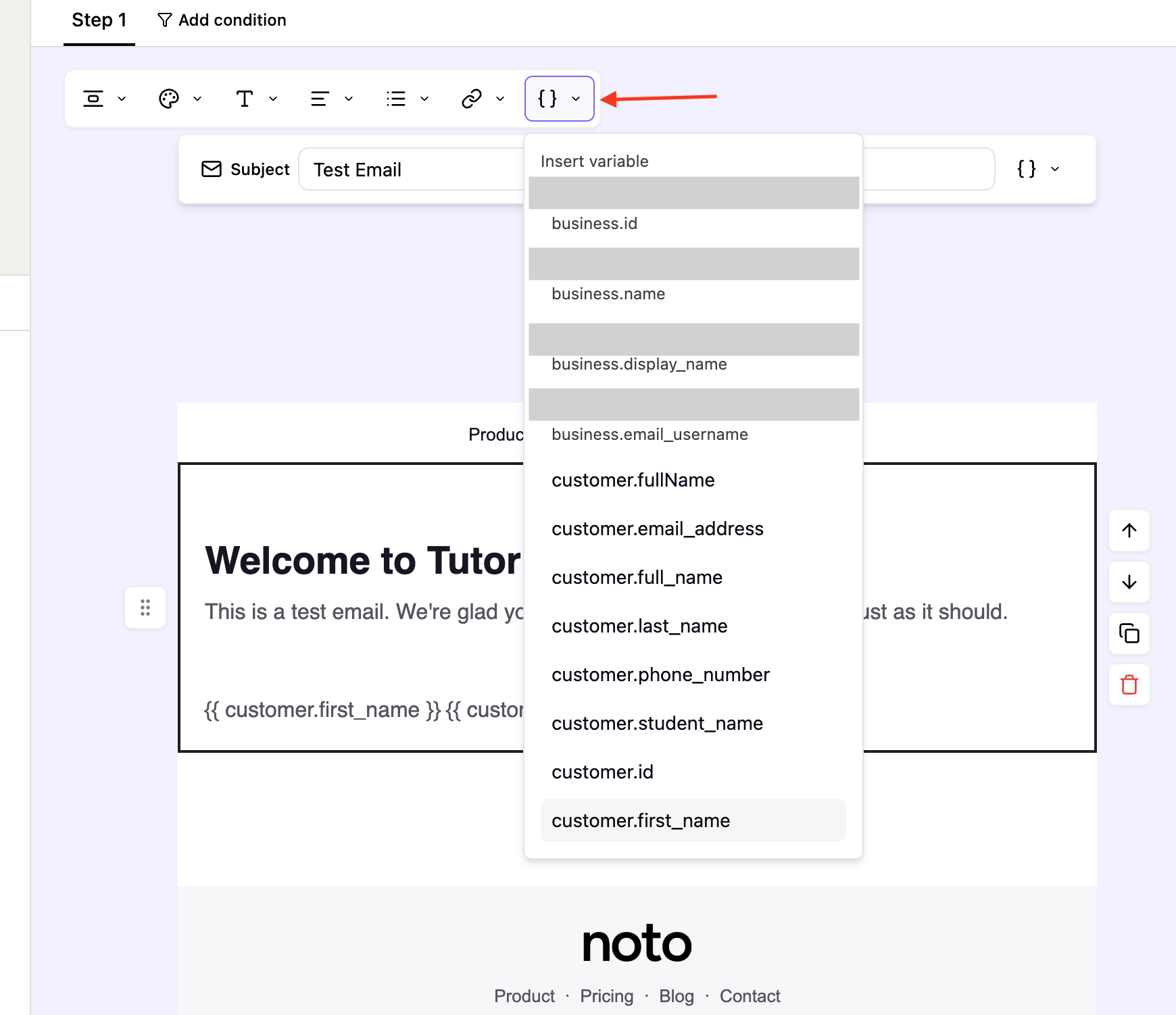
Embedding names
The marketing suite supports the followingname tags:
{{ customer.first_name }}— first name of the person being emailed.{{ customer.last_name }}— last name of the person being emailed.{{ customer.full_name }}— full name of the person being emailed, or "Guardian of <student name>" for emails sent to guardians but matched on student data.{{ customer.student_name }}— full name of whoever matches on, so you can reference the student name in the body of an email sent to a parent.
Rules and gotcha
Use double curly braces with a single space inside:
{{customer.first_name}}.Do not remove the spaces (
{{first_name}}), use single braces ({first_name}), or capitalize the field name ({{ First Name }}).If a recipient has no value saved for that field on their profile.